
BACK UP SQL SERVER TO ALIBABA CLOUD OSS
Alibaba Cloud Object Storage Service (OSS) is the leading object storage platform in China and across much of Asia-Pacific. SQL Backup Master ships with a dedicated Alibaba Cloud OSS destination template that connects through OSS's S3-compatible interface – this tutorial covers the OSS-specific setup: creating a bucket and access keys, finding your regional endpoint, and configuring the destination.
SQL Backup Master also includes a Simplified Chinese translation – the entire application, including the OSS destination settings, can be switched to Chinese from the program's language options.
Step 1: Create an OSS bucket
Sign in to the Alibaba Cloud console and open the Object Storage Service section. Create a bucket for your database backups, choosing a region close to your servers (for example, China (Hangzhou) or Singapore). Keep the default private access control. Note the region you selected – you'll need its endpoint in Step 3. The bucket must exist before you configure SQL Backup Master; the application will not create it for you.
Step 2: Create an AccessKey pair
SQL Backup Master authenticates to OSS with an AccessKey ID and AccessKey Secret. Create these in the Alibaba Cloud console – for security, Alibaba recommends creating them for a dedicated RAM user with permissions limited to your backup bucket, rather than for your root account. Record both values when the key is created; the secret is only shown once.
Step 3: Find your regional endpoint
Each OSS region has its own service endpoint in the form https://oss-<region>.aliyuncs.com – for example, https://oss-cn-hangzhou.aliyuncs.com for China (Hangzhou) or https://oss-ap-southeast-1.aliyuncs.com for Singapore. You can confirm the endpoint on your bucket's overview page in the OSS console. Use the public endpoint unless SQL Backup Master runs on an Alibaba Cloud ECS instance in the same region, in which case the internal endpoint avoids public traffic charges.
Step 4: Create the backup job
In SQL Backup Master, create a new backup job, connect to your SQL Server instance, and select the databases to protect. These steps are common to all destinations and are covered in detail in our Amazon S3 tutorial (Steps 3–5) – the process is identical here.
Step 5: Add the Alibaba Cloud OSS destination
In the Destinations section, click Add and double-click Alibaba Cloud OSS (S3). In the destination settings window, enter:
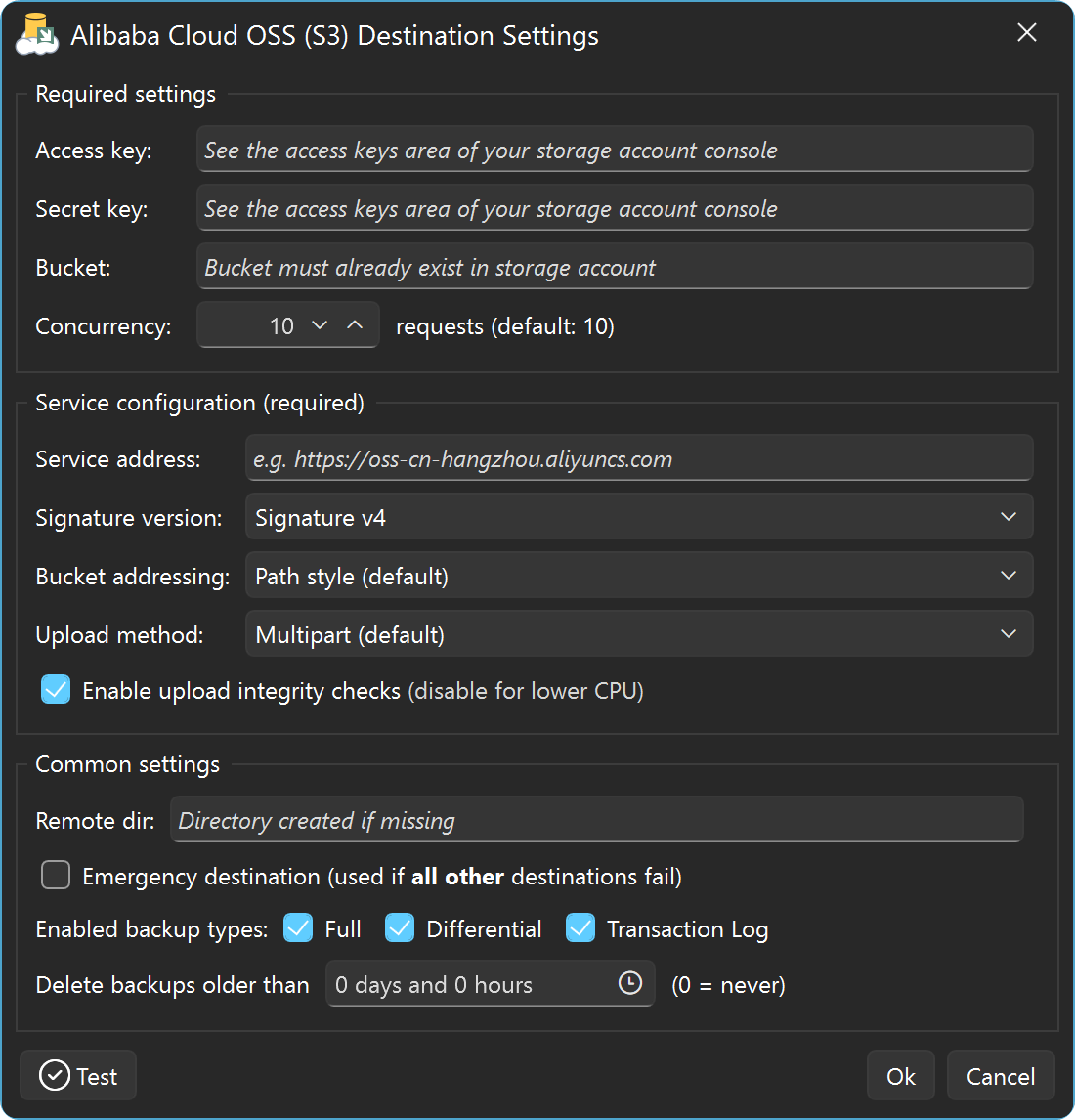
- Access key – your AccessKey ID from Step 2.
- Secret key – the matching AccessKey Secret.
- Bucket – the name of the bucket you created in Step 1.
- Service address – your regional endpoint from Step 3.
The template pre-configures the remaining S3 options (signature version, bucket addressing, and upload method) with values appropriate for OSS, so they can normally be left at their defaults. Click Test to verify the connection, then OK, and save the backup job.
Step 6: Schedule, run, and verify
Configure a recurring schedule if you'd like unattended backups, then run the job with Back up now. When it completes, review the job log and confirm the backup files appear in your OSS bucket via the Alibaba Cloud console.
Related resources
- Visual tour: backing up SQL Server to Alibaba Cloud OSS
- Custom S3 Compatible destination help – reference for all settings in the OSS destination window.
- S3-compatible services overview